Wednesday, January 13, 2016

Configuration steps to start the Workflow Notification mailer in Test environments

Introduction

At times, there is a need to receive the notification emails that are sent through the Oracle workflow mailer in Development and Test environments. However, these emails should not go to the mailboxes of the users of the system. Instead, they should be redirected to a common mailbox. This blog article is a step by step guide to configure the workflow mailer for the above objective.

Important Note: These steps should NEVER be performed in the production environment.

Steps

Part 1 - Configure the mail server and email sender

1)      Login using ‘SYSADMIN user and go to responsibility  ‘Workflow Administrator Web Application’ > Workflow Manager


2)     You will see Notification mailer is Down


3) Click on ‘Down’.You will find the below window.


4) To Configure Workflow Mailer, press on Edit button


5) You will find the below window


6) Set the Server Name to your Email /SMTP server. Set the ‘Reply-To-Address’ to ‘NoReplyTo@AtYourCompany.com’.


7) Click on button 'Advanced'


8) Press 'Next'


9) Press 'Next'


10) Press 'Next'


11)   Update from field to ‘Workflow Mailer <Name of the Test Environment>’ for e.g. “Workflow Mailer DEV”


Part 2 - Configure the override address

Override address is the address where all the emails will redirected. This can be configured from front end also. However following are the steps to set it up from back end.

1)      Run the below sql statement

    select fscpv.parameter_value
      from fnd_svc_comp_params_tl fscpt
          ,fnd_svc_comp_param_vals fscpv
     where fscpt.display_name = 'Test Address' 
                     and fscpt.parameter_id = fscpv.parameter_id;

2) The result should be ‘NONE’


3) Now run the below sql update statement and commit

UPDATE fnd_svc_comp_param_vals fscpv 
  SET fscpv.PARAMETER_VALUE = 'redirectaddress@yourcompany.com' --( put the email address to which all emails will be redirected)
WHERE fscpv.parameter_id 
(SELECT fscpt.parameter_id
  FROM fnd_svc_comp_params_tl fscpt
 WHERE fscpt.display_name = 'Test Address');


4) Now run the SQL in Step 1 to verify that the email address has been set as required.

5) Now start the workflow mailer by going to ‘Workflow Administrator Web Application’ > Workflow Manager.   You will see Notification mailer is Down. Click on 'Down'. On next page '1)      Select ‘Start’ from drop down list and Press on Go button.


6) After the above step the workflow notification mailer should start and the status should be 'Running'.

Part 3 - Test the setup

1) Click on 'Workflow Notification Mailer'.


2)  Click on ‘Test Mailer’


3) Select a valid user for which email address has been setup and click 'Accept' button.

Two test emails should be sent to the email address that you have setup in the Part 2 (step 3). The emails should not be sent to the actual email address that is set for the user that you have selected.

This completes the steps needed to redirect emails on your test or development environment. Enjoy!!

Thursday, July 30, 2015

Oracle Applications : Delete concurrent program & executable


The concurrent program and executable cannot be deleted from Oracle Applications front end,  instead you can only disable the concurrent program. This is because if deletion is allowed then the corresponding history of previous runs, audit records will be left with orphan records.

But sometimes during the development phase, you would want the option of deleting the concurrent program and executable. Following is the code snippet to delete a concurrent program and its executable from database.

------------------------------------------------------------
------------------------------------------------------------
begin
------------------Program Short Name, Application Name 
if fnd_program.PROGRAM_EXISTS('XXWS01A',''My ABC Application') then
   fnd_program.DELETE_PROGRAM('XXWS01A',''My ABC Application');
end if;

------------------Executable Short Name, Application Name 
if fnd_program.EXECUTABLE_EXISTS('XXWS01A',''My ABC Application') then
   fnd_program.DELETE_EXECUTABLE('XXWS01A','My ABC Application');
end if;

end;
/

commit;
/
------------------------------------------------------------
------------------------------------------------------------

Tuesday, June 16, 2015

Basic Accounting and Finance

Accounting
=======================
Accounting is internally and operationally oriented. It mostly deals with transactions that have taken place and data that's been recorded.
It also includes preparing, presenting and interpreting financial statements.

Finance
======================
Finance is more strategically oriented. It often involves factors external to the organisation, and its activities are aimed at aiding decision making.
Finance deals with planning related and futuristic information.
Finance areas include short-term and long-term financing, management and control of assets and investments, and determining and managing project risks.

Types of Accounting
======================
1) Cash Based - In this type, business records cash inflow and outflow.
2) Accrual Based - In this type, business records sales revenue as soon as the sales is made, regardless of when the customer pays.

Cash based accounting is inadequate for most businesses, as they sell and buy on credit, carry inventories, invest in long term operating assets or make long term commitments such as employee pensions.

Cash based accounting is okay for personal accounts, businesses usually have accrual based accounting.

Types of record keeping documents
=================================
1) Journal - A book that records a businesses transaction in chronological order. Journalization is the daily recording of debits and credits.
Journals - also referred to as the 'books of original entry' - are where all the transactions are entered first. Businesses may maintain separate journals for different types of transactions for e.g. sales journal for recording sales transactions etc.

2) Ledger - The ledger - or General Ledger, as it is sometimes called - is distinct from a journal. The ledger is where the various accounting entries are sorted into their appropriate accounts. This is called 'Posting to the ledger'. The ledger is the 'book of final entry' and all financial statements are prepared from it.


Types of Risk
=================
Default Risk - refers to the likelihood that you will fail to get your money back or receive the return you are due. Assessing this risk means deciding if the company in which investment is made is likely to default.

Inflation Risk - refers to the chances that predictable overall economic rise in prices for goods and services will cause the investments to loose some of its value. Investment in long term ventures presents greater inflation risk than short term ventures.

Maturity Risk - refers to the gamble taken when investors tie up their cash in investments that require a set period. When money in tied up in long term investments, it cannot be used for other, perhaps more profitable purposes.

Liquidity Risk - refers to the possibility that an investment may need to sold to free up cash. An investment's liquidity is how readily it can be converted back to cash prior to maturation, or if that's even possible. The easier it is to sell off asset when needed, the lower the liquidity risk.

Accounting Principles
=====================
Business Entity Principle - As per this principle the purpose of accounting is to keep records of the transaction only for the organization, not for the people involved.

Money Management Principle - Considers only the financial aspects of the business (such as gross profit, net profit etc.), allowing simple evaluation and comparison.

Going Concern Principle - Maintains businesses will operate over an extended period, so valuation of assets can be simplified.

Cost Based - Use the price originally paid for an item for accounting purposes, as it's a convenient and objective value.

Realization Principle - Holds that revenue should be recorded at the time goods or services are delivered (i.e Accrual based accounting).


Basic Accounting  Equation
=======================
Assets = Liabilities + Owner's Equity


Three Financial Statements - Characteristics
===================================

Earnings Statement, P&L Statement
   => Statement for a given period of time.
   => It is is the statement of Profit.
   => Shows net profit (or losses) as the difference between revenues and expenses
   => Shows the profitability and the operations of a company over a specific period of time
 
Cash Flow Statement
   => Statement for a given period of time.
   => It is the statement of Liquidity.
   => Shows the actual cash inflows and outflows from operating, investing, and financing activities.
   => Shows the change in cash balances for a specific period of time.

Balance Sheet
   => Statement at a point in time.
   => It sums up the financial condition.
   => Shows the financial position of a company at a certain point in time
   => Balances assets owned by a company with its liabilities plus owners' (or shareholders') equity


Relationship between the statements
=============================
Net Income from Earnings Statement is used to calculate the Cash Flow Statement. It is the first line in the Cash Flow Statement.
Net Cash at the end of Cash Flow statement is used as a Current Cash in the Balance Sheet statement.
Net Income from Earnings Statement is used as Retained Earnings in Balance sheet (assuming no dividends are paid).


Some other points
===================
Revenue => Something which is recognized when the transaction takes place (i.e. the Customer receives the value). This principle of recognizing revenue when a transaction takes place is called 'Accrual Based Accounting', this is the method that is generally accepted by all major Accounting standards.
The other principle of recognizing revenue when the actual cash is received is called 'Cash Based Accounting', this is not preferred method of accounting.
Mainly because so many business work on credit nowadays.

Receipts => Actual receipt of the cash. May be at a different date than the revenue recognition date, generally later.

Income Statement (Profit & Loss Statement
======================================
Gross profit  = Net revenue - cost of goods sold
Operating income =  Gross profit - operating expenses
Net income  = Operating Income - Expenses - Taxes

Balance Sheet
=======================
Balance sheet should represent the equation
Assets = Liabilities + Equity
where
Assets = Current Assets + Fixed Assets
Liabilities = Current Liabilities + Long Term Liabilities
Equity = Shareholder's Equity Investment + Retained Earnings
Retained Earnings = Previous Retained Earnings + Net Income - Dividends Paid.

Cash Flow Statement
============================
Cash flow statement is required because normally the 'Accrual Based' accounting is followed, which doesn't give true picture of the Cash.
If 'Cash Based' accounting is followed then there would be no need to generate a Cash flow statement.

1) Operating Activities - show cash transactions that create revenues and expenses. Often these related to current assets and liabilities.
( Current Asset is one that can be easily converted to cash. Example of current assets are Cash, Bonds, Accounts Receivable
  Current Liability are obligations that need to be settled within within one year or less (or to be settled in same fiscal year).
  Example of current liabilities are Short term bank loans, Account Payable, Wages Payable, Tax Payable, Interest Payable)
Cash flows in from the sale of goods and services, from interest on loans, and from dividends received.
Cash flows out to suppliers for inventory, to employees for wages, to the government for taxes, to lenders for interest on loans, and to others for various expenses.

2) Investing Activities - show cash transactions that affect fixed assets.
(Fixed assets, also referred to as long term assets, are assets used by organization that won't be converted to cash immediately.
 Fixed assets are those that an organization needs to produce goods and services. For example property, plant and equipment are fixed assets).
Cash flows in from the sale of property, plant, and equipment; from the sale of debt or equity securities of other businesses; and from the collection of principal on loans to other businesses.
Cash flows out to purchase property plant, and equipment; to purchase debt or equity securities of other businesses; and to make loans to other companies.

3) Financing Activities - show cash transaction related to long-term liabilities and equity financing.
( Long term liabilities are obligations that won't be fulfilled within the next 1 year (or fiscal year).
  Example of Long term liabilities are mortgages that persist over a number of years, bonds payable, pensions
  Equity financing encompasses cash provided by Owner/Shareholder and Dividends paid)
Cash flows in from the sale of the company's own stock and from issuing bonds and notes.
Cash flows out to stockholders as dividends, to repay long-term debt, and to repurchase the company's own stock.

Thursday, January 22, 2015

Oracle Workflow Training Topics

Following is the list of topics that should be covered in Oracle Workflow Training. The topics are exhaustive and have been divided to fit into two days (approx 7-8hrs per day). 

Day 1

• Talk about business process – P2P,  O2C
• Why a workflow helps in streamlining a business process.
• BPEL, workflow of future
• Workflow Server and Workflow Builder. How the development works. WFT file is created, when stored in database the definition goes to tables, specifically WF_ITEM_TYPES.
• WF_ENGINE is made up of PL/SQL packages.
• Case Study – Vacation approval system.
• Attributes, Message / Notification, Performers, Function, Process, Events.
• Overview of Workflow Builder. WFSTD and WFERROR processes.
• Bottom Up approach and Top down approach.
• Add WFSTD and WFERROR item to the new workflow that you define.
• Research on “Preferences SSWA” responsibility and the functionalities that it provides.
• Various functions available in the “Workflow Administrator” responsibility.
• Use “Developer Studio” function to run the workflow that you have developed. It should show the “Run” column.
• Link between WF_USER and FND_USER. Tables WF_USERS, WF_ROLES and WF_USER_ROLES.
• Notifications can be sent through email or to the worklist.


Day 2

• Hands-on – Continue working on modifying the Vacation approval example. Add a timeout activity. Add a Loop counter. Add a update function to update table.
• Workflow background process. Different parameters passed to this programs.
• Deferred activities.
• URL attribute, Form Attribute.
• Workflow Roles
• Send and Respond attributes.
• Calling one process from another. Parent and Child process.
• Business Event system – When workflow wants to communicate with external systems. 


Also on this site Core Java Training topics
http://tenthsense.blogspot.in/2013/02/core-java-course-contents.html

Drop a comment if you have any workflow training requirement


Search and Replace in Oracle Forms

In Oracle Forms, many times there is a need to search and replace text, for example change the name of some database objects. If there are few forms, the search-replace exercise can be done using Oracle Forms Builder. But if it needs to be done for large number of forms an automated approach, which can be easily applied to the batch needs to be devised. 

Following is some research related to the same:

1) Oracle forms can be converted to text and vice versa (i.e. FMB to FMT and FMT to FMB). However, in the text file all the PL/SQL code gets converted to a cryptic text. This file therefore cannot be used for search & replace.

2) Oracle also provides another option to convert the form to XML format and vice versa (i.e. FMB to XML and XML to FMB). The PL/SQL code in the XML format doesn’t is in readable format and hence we can search and replace text. I was able to change the code in sample form and convert it back to FMB successfully. However, I noticed that there the color of the Canvas changed to a different color. There could be some other hidden after effects as well mainly in the UI.

3) Oracle provides a third option, which is to programmatically modify the form files. This was originally a C language API which was complex to use. But recently Oracle has also provided a Java API for this. As this is programmatic, I hope this to be much cleaner than the XML option. Also, more suited for developing a tool. This needs to be researched further.

Notes from research:

1) To convert FMB to text format (FMT) and vice-versa
Open the form in Form Builder. Go to menu File -> Convert.

2)      Command to convert FMB to XML 
frmf2xml.bat OVERWRITE=YES XXARCUST_2.fmb

3) Command to convert XML to FMB
frmxml2f OVERWRITE=YES USERID=<usr>/<pass>@<db> XXARCUST_2_fmb.xml

4) Useful links


Tuesday, December 23, 2014

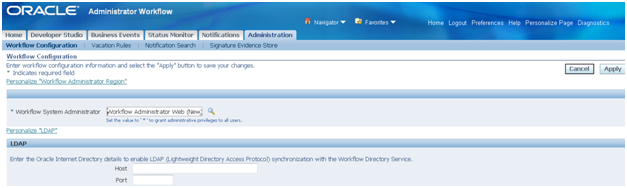
How to assign Oracle Workflow Administrator privileges to users

The workflow administrator privilege can be assigned to a particular user, responsibility or to everyone. The setup is done using the Administration function. Navigate to ‘Workflow Administrator (Responsibility) => Administrator Workflow (Menu) => Administration (Function).

In the field ‘Workflow System Administrator’ set the value to which you want to assign the workflow administrator privilege.

· To make ‘SYSADMIN’ user the workflow system administrator set the value as ‘SYSADMIN’


· To make all users workflow system administrators set the value as ‘*’.


·        To make all users having a particular responsibility as workflow system administrators choose the responsibility using the torch button. Generally, the responsibility ‘Workflow Administrator Web (New)’ is chosen for this purpose.


Thursday, August 14, 2014

How to enable Workflow ‘Notifications Search’ in Oracle Apps R12

How to enable ‘Notifications Search’ in Oracle Apps R12
The workflow notifications search functionality is not enabled by default in R12. You need to assign the corresponding search function as described below.
Step 1
Identify the menu attached to the responsibility in which you want to provide the notification search functionality.
Make an entry in the menu with prompt ‘Notifications Search’ and function ‘Workflow Notification Search’


Step 2
Assign the role ‘WF_ADMIN_ROLE’ either individually to the users or to the responsibility. This can be using the ‘Users Management’ responsibility. Search for the User to which you want to assign the role and then click the ‘Update’ icon.


Step 3
On the next page, click ‘Assign Roles’ and assign the role ‘Workflow Admin Role’ to the user.

           
Step 4
Now when the user logs in to applications, the Notification Search will be visible.