Showing posts with label Oracle Apps. Show all posts

Thursday, July 30, 2015

Oracle Applications : Delete concurrent program & executable


The concurrent program and executable cannot be deleted from Oracle Applications front end,  instead you can only disable the concurrent program. This is because if deletion is allowed then the corresponding history of previous runs, audit records will be left with orphan records.

But sometimes during the development phase, you would want the option of deleting the concurrent program and executable. Following is the code snippet to delete a concurrent program and its executable from database.

------------------------------------------------------------
------------------------------------------------------------
begin
------------------Program Short Name, Application Name 
if fnd_program.PROGRAM_EXISTS('XXWS01A',''My ABC Application') then
   fnd_program.DELETE_PROGRAM('XXWS01A',''My ABC Application');
end if;

------------------Executable Short Name, Application Name 
if fnd_program.EXECUTABLE_EXISTS('XXWS01A',''My ABC Application') then
   fnd_program.DELETE_EXECUTABLE('XXWS01A','My ABC Application');
end if;

end;
/

commit;
/
------------------------------------------------------------
------------------------------------------------------------

Thursday, January 22, 2015

Search and Replace in Oracle Forms

In Oracle Forms, many times there is a need to search and replace text, for example change the name of some database objects. If there are few forms, the search-replace exercise can be done using Oracle Forms Builder. But if it needs to be done for large number of forms an automated approach, which can be easily applied to the batch needs to be devised. 

Following is some research related to the same:

1) Oracle forms can be converted to text and vice versa (i.e. FMB to FMT and FMT to FMB). However, in the text file all the PL/SQL code gets converted to a cryptic text. This file therefore cannot be used for search & replace.

2) Oracle also provides another option to convert the form to XML format and vice versa (i.e. FMB to XML and XML to FMB). The PL/SQL code in the XML format doesn’t is in readable format and hence we can search and replace text. I was able to change the code in sample form and convert it back to FMB successfully. However, I noticed that there the color of the Canvas changed to a different color. There could be some other hidden after effects as well mainly in the UI.

3) Oracle provides a third option, which is to programmatically modify the form files. This was originally a C language API which was complex to use. But recently Oracle has also provided a Java API for this. As this is programmatic, I hope this to be much cleaner than the XML option. Also, more suited for developing a tool. This needs to be researched further.

Notes from research:

1) To convert FMB to text format (FMT) and vice-versa
Open the form in Form Builder. Go to menu File -> Convert.

2)      Command to convert FMB to XML 
frmf2xml.bat OVERWRITE=YES XXARCUST_2.fmb

3) Command to convert XML to FMB
frmxml2f OVERWRITE=YES USERID=<usr>/<pass>@<db> XXARCUST_2_fmb.xml

4) Useful links


Tuesday, December 23, 2014

How to assign Oracle Workflow Administrator privileges to users

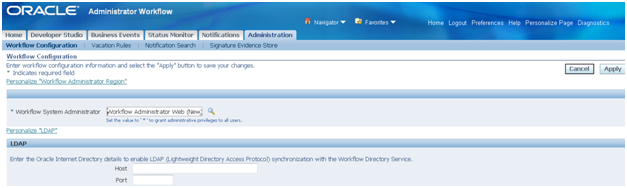
The workflow administrator privilege can be assigned to a particular user, responsibility or to everyone. The setup is done using the Administration function. Navigate to ‘Workflow Administrator (Responsibility) => Administrator Workflow (Menu) => Administration (Function).

In the field ‘Workflow System Administrator’ set the value to which you want to assign the workflow administrator privilege.

· To make ‘SYSADMIN’ user the workflow system administrator set the value as ‘SYSADMIN’


· To make all users workflow system administrators set the value as ‘*’.


·        To make all users having a particular responsibility as workflow system administrators choose the responsibility using the torch button. Generally, the responsibility ‘Workflow Administrator Web (New)’ is chosen for this purpose.


Wednesday, July 30, 2014

How to Set Org Context in Oracle Apps R12

begin
mo_global.init ('PO');   -- The short name of the application
mo_global.set_policy_context('S',103); -- ‘S’ for single org and second parameter for the Org ID
end;
/

Friday, December 20, 2013

How to identify the Activity ID for a Oracle Workflow Activity


Sometimes, we have to run the function attached to a workflow activity to see how it had worked for a particular run of a workflow. The standard definition of workflow functions has four input parameters viz. Item Type, Item Key, Function Mode and Activity ID. The Item Type and Item Key can easily be found on the workflow status monitor page. The Function Mode is normally RUN. Getting the value for Activity ID can be tricky. This is how the activity ID can be found in two different scenarios.

2.   Scenario – The workflow activity has encountered error.

          In this case you can get the activity by going to the Workflow Status Monitor -> Activity           History Table -> Click on the Error link on Status column. The error details page will give             you the Activity ID as shown below:


3.   Scenario – The workflow activity has completed successfully.
In this case the Activity ID is not available anywhere on the workflow status monitor page. So in this case the following query should be ran to get the Activity ID.
This query takes the ‘Activity Internal Name’,’ Item Type’ and ‘Item Key’ as input. The Activity ID is the INSTANCE_ID as available in the table WF_PROCESS_ACTIVITIES.

        SELECT WI.ITEM_TYPE
              ,WI.ITEM_KEY
              ,WI.BEGIN_DATE
              ,WPA.INSTANCE_ID ACTIVITY_ID
              ,WPA.ACTIVITY_NAME ACTIVITY_NAME
              ,WPA.PROCESS_NAME
          FROM APPS.WF_ITEMS WI
              ,APPS.WF_ITEM_ACTIVITY_STATUSES WIAS
              ,APPS.WF_PROCESS_ACTIVITIES WPA
         WHERE WI.ITEM_TYPE = WIAS.ITEM_TYPE
           AND WIAS.ITEM_TYPE = WPA.PROCESS_ITEM_TYPE
           AND WI.ITEM_KEY = WIAS.ITEM_KEY
           AND WIAS.PROCESS_ACTIVITY = WPA.INSTANCE_ID
           AND WPA.ACTIVITY_NAME = UPPER('&Activity_Name')
           AND WI.ITEM_TYPE = UPPER('&Workflow_Item_Type')
           AND WIAS.ITEM_KEY = UPPER('&Workflow_Item_Key')


This query may return multiple rows in case the activity is used multiple times within a process. In such a case, you should can identify the Activity ID based on the number of times the activity has occurred within the process. 
(Hint: The Activity ID is a numeric value which keeps on increasing in value)

Identification and Removal of Unused Custom Functionality in Oracle EBS - Part 3


The initial list of unused PL/SQL code objects (Packages/Procedures/Functions) can be identified based on the strategy discussed in Identification section above. Also the unused application components (Workflows, Forms and Reports) removed above will give us additional list of PL/SQL code objects that can potentially be removed.
We then need to verify if the PL/SQL code object is not used in any workflow activity, view definition, any other package, oracle form, oracle report or concurrent program executable.
Check if the PL/SQL code object is used in any workflow activity.

SELECT *
  FROM wf_activities
 WHERE UPPER (function) LIKE UPPER('%<PACKAGE_NAME>%')
   AND end_date IS NULL
 ORDER BY version

Check if the PL/SQL code object is used in any views, packages, procedures, functions etc.

SELECT ad.name, -- Referencing Object
       ad.type, -- Type of referencing object
       ad.*
  FROM all_dependencies ad
 WHERE referenced_name LIKE UPPER('%<PACKAGE_NAME>%')

Check if the PL/SQL code object is used in any concurrent executable
     
SELECT *
  FROM fnd_executables
 WHERE UPPER (execution_file_name) LIKE UPPER('%<PACKAGE_NAME>%')
   AND execution_method_code = 'I' -- ‘I’ for Oracle PLSQL Code

Check if the PL/SQL code object is used in any form
     
Go to $AU_TOP/forms/US
grep –ir <PACKAGE_NAME> *.fmb

Check if the PL/SQL code object is used in any report
     
Go to $CUSTOM_TOP/reports/US
grep –ir <PACKAGE_NAME> *.rdf


The package, procedure or function can be removed using the following SQL command.
DROP PACKAGE <PACKAGE_NAME>
DROP PROCEDURE <PROCEDURE_NAME>
DROP FUNCTION <FUNCTION_NAME>


The initial list of unused database views can be identified based on the strategy discussed in Identification section above. Also the unused application components removed will give us additional list of views that can potentially be removed.
We then need to verify if the views are not used in any code such as package/procedure/function, oracle form, oracle report, table type value set and flex fields.
Check if the view is used in any other view, package, procedure, function etc.
     
SELECT ad.name, --Referencing Object
       ad.type, -- Type of referencing object
       ad.*
  FROM all_dependencies ad
 WHERE referenced_name LIKE UPPER('%<VIEW_NAME>%')

Check if the view is used in any value set definition
     
SELECT *
  FROM fnd_flex_validation_tables
 WHERE UPPER(application_table_name) LIKE UPPER('%<VIEW_NAME>%')

Check if the view is used in any descriptive flex field definition
     
SELECT *
  FROM fnd_descriptive_flexs_vl
 WHERE UPPER(application_table_name) LIKE UPPER('%<VIEW_NAME>%')

Check if the view is used in any key flex field definition
     
SELECT *
  FROM fnd_id_flexs
 WHERE UPPER(application_table_name) LIKE UPPER('%<VIEW_NAME>%')

Check if the view is used in any form
     
Go to $AU_TOP/forms/US
grep –ir <VIEW_NAME> *.fmb

Check if the view is used in any report
     
Go to $CUSTOM_TOP/forms/US
grep –ir <VIEW_NAME> *.rdf


The view can be removed using the following SQL command.
DROP VIEW <VIEW_NAME>


The initial list of unused database tables can be identified based on the strategy discussed in Identification section above. Also the unused application components removed will give us additional list of tables that can potentially be removed.
We then need to verify if the tables are not used in any code such as view definition, package/procedure/function, oracle form, oracle report, table type value set and flex field.
Check if the table is used in any views, package, procedure, function etc.

SELECT name,-- Referencing Object
       type -- Type of referencing object
  FROM all_dependencies
 WHERE referenced_name LIKE UPPER('%<TABLE_NAME>%')

Check if the table is used in any value set definition
     
SELECT *
  FROM fnd_flex_validation_tables
 WHERE UPPER(application_table_name) LIKE UPPER('%<TABLE_NAME>%')

Check if the table is used in any descriptive flex field definition
     
SELECT *
  FROM fnd_descriptive_flexs_vl
 WHERE UPPER(application_table_name) LIKE UPPER('%<TABLE_NAME>%')

Check if the table is used in any key flex field definition
     
SELECT *
  FROM fnd_id_flexs
 WHERE UPPER(application_table_name) LIKE UPPER('%<TABLE_NAME>%')

Check if the table is used in any form
     
Go to $AU_TOP/forms/US
grep –ir <TABLE_NAME> *.fmb

Check if the table is used in any report
     
Go to $CUSTOM_TOP/forms/US
grep –ir <TABLE_NAME> *.rdf

Check the latest time a DML Commit operation was performed on a table. If the table stores transactional data, this query will give you a good indication of whether the table is used or not.
Note: The following query will not consider SELECTs performed on the table.
     
SELECT SCN_TO_TIMESTAMP(MAX(ora_rowscn))
  FROM <TABLE_NAME>


The table can be removed using the following SQL command. It is also a suggested to take a temporary backup of the table data before dropping the table.
CREATE TABLE <TABLE_NAME_BKUP>
         AS (SELECT * FROM <TABLE_NAME>);

DROP TABLE <TABLE_NAME>;


Tuesday, December 17, 2013

Identification and Removal of Unused Custom Functionality in Oracle EBS - Part 2


The initial list of unused forms can be identified based on the strategy discussed in Identification section above.
Additionally, unused forms can also be identified by checking the latest time when each form was accessed by a user. Forms which were accessed long back are probably not in use any more and are likely candidates for removal.
Note: The following query will give latest access time for a form only if -
a.     The value for the profile ’Sign-On:Audit Level’ is set to ‘FORM’ and
b.     The built in ‘FND_STANDARD.FORM_INFO’ is called in the ‘PRE-FORM’ trigger with appropriate values for the form.

SELECT ff.form_name,
       MAX(flrf.start_time) last_accessed_time
  FROM fnd_form ff,
       fnd_login_resp_forms flrf      
 WHERE ff.form_id = flrf.form_id (+)
   AND UPPER(ff.form_name) LIKE 'XX%'
 GROUP BY ff.form_name  
 ORDER BY ff.form_name


 Check if any other form is calling the identified form.
Go to $AU_TOP/forms/US
grep –ir <FORM_NAME> *.fmb


Following steps need to be carried out to remove the form.
1) Delete the <FORM_NAME>.fmb file from to $AU_TOP/forms/US
rm –f <FORM_NAME>.fmb

2)Delete the <FORM_NAME>.fmx file from to $CUSTOM_TOP/forms/US
rm –f <FORM_NAME>.fmx

3) Remove the Form Function from the menu
4) Delete the Form Function


The initial list of unused reports can be identified based on the strategy discussed in Identification section above.
Additionally, unused reports can also be identified by checking if the corresponding concurrent programs are disabled.

SELECT fe.execution_file_name,
       fcp.concurrent_program_name
  FROM fnd_executables fe,
       fnd_concurrent_programs fcp
 WHERE fe.execution_method_code = 'P'    -- ‘P’ for Oracle reports
   AND fe.executable_id = fcp.executable_id
   AND fcp.enabled_flag = 'N'
   AND fe.execution_file_name LIKE 'XX%' -- Assuming custom reports are   -- named starting with XX

For each unused report the corresponding executable and concurrent program can be identified. The concurrent program can then be verified as follows.
Check the last time when the report concurrent program was ran.
Note: This data might not give correct usage picture as normally the concurrent program run data is frequently purged.

SELECT *
  FROM fnd_conc_req_summary_v
 WHERE program_short_name LIKE UPPER('%<PROGRAM_SHORT NAME>%')
  AND TRUNC (actual_start_date) < TRUNC (SYSDATE-365)


Following steps need to be carried out to remove the report.
1)Delete the corresponding executable and the concurrent program
BEGIN
  FND_PROGRAM.DELETE_EXECUTABLE ('<EXECUTABLE_SHORT_NAME>', '<APPLICATION_NAME>');

  FND_PROGRAM.DELETE_PROGRAM ('<PROGRAM_SHORT_NAME>', '<APPLICATION_NAME>');
END;

2)Delete the <REPORT_NAME>.rdf file from to $CUSTOM_TOP/reports/US
rm –f <REPORT_NAME>.rdf